Posts

Showing posts with the label Azure Error

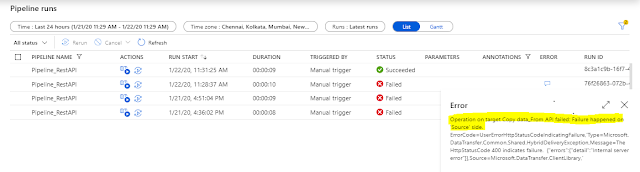
Operation on target Copy data failed: Failure happened on 'Source' side
Image
A simple Pipeline created to fetch data by querying the Rest Api and dumping the data received in blob storage, failed with following error: Error Operation on target Copy data_From API failed: Failure happened on 'Source' side. ErrorCode=UserErrorHttpStatusCodeIndicatingFailure,'Type=Microsoft.DataTransfer.Common.Shared.HybridDeliveryException,Message=The HttpStatusCode 400 indicates failure. {"errors":{"detail":"Internal server error"}},Source=Microsoft.DataTransfer.ClientLibrary,' Why it happened As the error says, something went wrong at source side however, I have tested the Rest API using postman and was able to get the response back with data. And I have reflected same in Source setting of Copy Data activity while creating the pipeline i.e. query, headers – content type and authorization etc Still getting the error, I rechecked again the keys,content type etc - no clue. Too...

'authority' Uri should have at least one segment in the path

Image
Working on demo of calling AD secured function app from another function app. All testing went fine on my local machine however below error was thrown while testing after publishing it to portal. Error 2020-01-08T09:52:07.451 [Error] Executed 'CallerFunctionHttpTrigger' (Failed, Id=e8d196b0-b077-447d-a8d8-07458c4873cb) 'authority' Uri should have at least one segment in the path (i.e. https://<host>/<path>/...) Parameter name: authority Why it happened In my code am referring to TenantID  to form the authority URi ,which is to be fetched from AppSettings at runtime. And below are the lines of code which is to get the access token from Azure AD and error was thrown against the first line (marked in yellow)  AuthenticationContext authenticationContext = new AuthenticationContext ("https://login.microsoftonline.com/"+ Environment.GetEnvironmentVariable("TenantID")); ClientCredential...

Web deployment task failed - cannot modify the file 'xxx.dll' on the destination because it is locked by an external process.

Image
When you create function using portal, the moment you save it - it is deployed. Whereas when you develop using visual studio, one extra step gets added i.e. publishing it to Azure. When you publish,the .dll file gets uploaded and thus code is not visible in portal. So if any changes have to be done, you revisit VS, do the change and publish. And while doing the same, below error was encountered. Error C:\ProgramFiles\dotnet\sdk\2.1.403\Sdks\Microsoft.NET.Sdk.Publish\build\netstandard1.0\PublishTargets\Microsoft.NET.Sdk.Publish.MSDeploy.targets(139,5): error : Web deployment task failed. (Web Deploy cannot modify the file 'DevT.dll' on the destination because it is locked by an external process. In order to allow the publish operation to succeed, you may need to either restart your application to release the lock, or use the AppOffline rule handler for .Net applications on your next publish attempt. Learn more at: http://go.microsoft.com/fwlink/?Lin...

The template language expression 'xxx' cannot be evaluated because property 'xxx' doesn't exist. Property selection is not supported on content of type 'application/xml'

Image
While doing a POC -  Getting Started with Logic Apps - What happened to the Request? I tried to use the orderID node's value in the subject of the send email action from the triggerBody(),t he message to trigger logic app is as below <purchaseOrder>     <orderID>PO0029</orderID>     <orderDate>2019-07-20</orderDate>     <description>Discount applied on the Order</description>     <shipTo>         <name>Mike Taylor</name>         <street>MG Road</street>         <city>Pune</city>         <state>MH</state>         <pin>410701</pin>         <country>India</country>   ...